Why connect
Reaching the right rep used to mean text threads, Facebook groups and generic contact forms. Connections give you a direct line to the reps who show up for you.
- You choose the rep
Work with the reps you already know and enjoy working with, not just the OSC.
- They’re looped in early
When you or your buyer act on their homes, leads can route directly to them.
- Your buyer stays yours
Your buyer’s contact info is never shared with the builder.
Only agents can start a connection. Reps can share their Personal Link and ask you to click Connect. That’s what keeps you in control.
1Agent Portal
Connect from your portal
Click Builder Connections in the left menu, then Connect with a Builder Rep.
Type the rep’s name. Each rep shows their connection count. Pick yours and click Connect. You both get an email.


 Harrison Voss18EmailCallCypress Landing Homes - HoustonVIEW HOMES
 Daniel Ruiz11EmailHarbor Oak Builders - Houston + ConroeVIEW HOMES
 Lauren Pierce7EmailCallLarkspur Homes - ConroeVIEW HOMES
Connect with a Builder Rep
Connect with the builder reps you like working with. They’ll be looped in when your clients show interest—but your contact info stays front and center, and your client’s info is never shared with the builder.
Start typing to searchHannHarrison Voss
CANCELCONNECT
Harrison Voss18EmailCallCypress Landing Homes - HoustonConnected with Harrison VossYou both get an email. Harrison is now your contact on the Cypress Landing homes she can sell.
2A rep’s Personal Link
Or connect from a rep’s link
A rep’s Personal Link now opens inside your own portal, and you stay signed in.
Click Connect in the header. Or click the handshake icon on any home to connect without losing your place.
- Not signed in? Answer Yes to “Are you a Real Estate Agent?”, create your account, and the Connect tab opens when you log in.
- Already connected? You land on the homes that rep prepared for you.
When you open a rep’s link signed in, they see your name and contact info in their Activity, so they can start the conversation. Only you can connect.
Harrison Voss’s New Home SearchCONNECT WITH HARRISON VOSSSearch Created for Natalie BrooksPrepared by Harrison VossSearch homes by address
Describe your home searchPriceBedsBathsBuild StatusMoreVIEW FAVORITED HOMES
19 HOMES
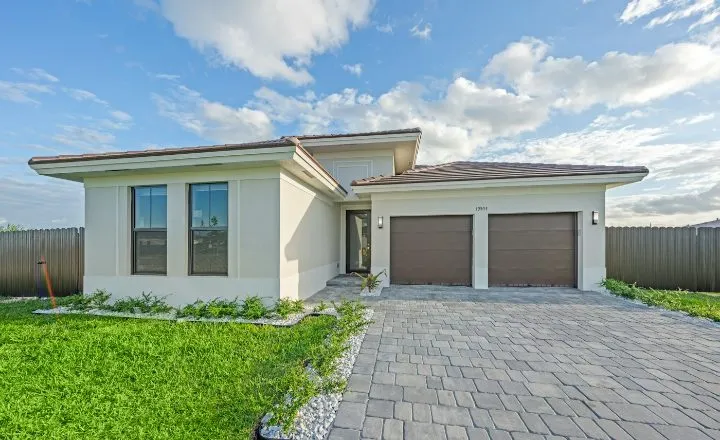 CYPRESSHOMESHARRISON14 Juniper BendOak TerraceConroe, TX$587,400 Move In Ready4 bds · 3.5 ba · 2690 sqft
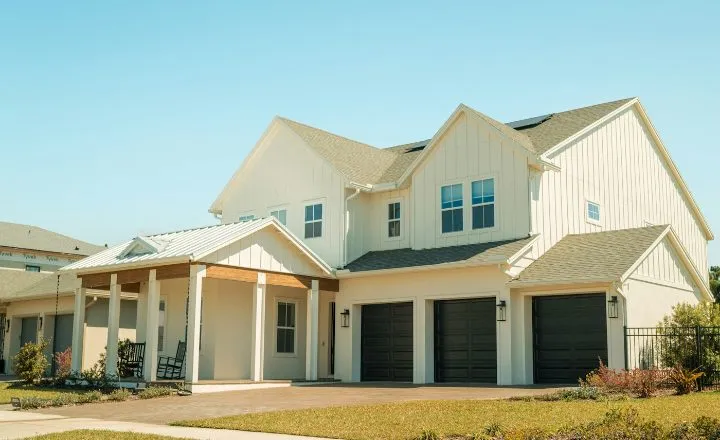 CYPRESSHOMESHARRISONAsterOak TerraceConroe, TXStarting from $449,9904 bds · 3 ba · 2480 sqft
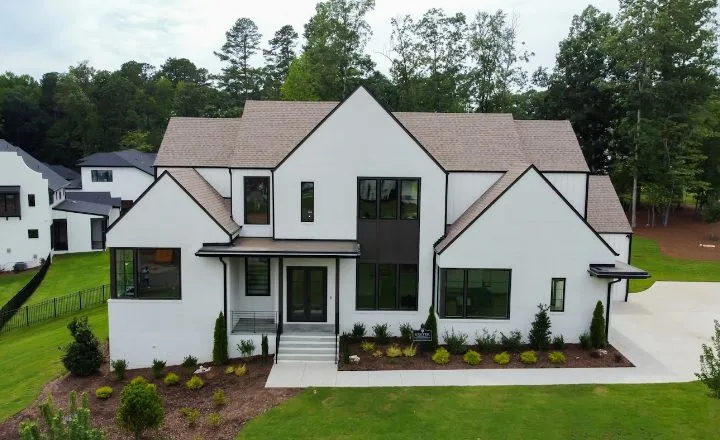 CYPRESSHOMESHARRISON18 Juniper BendOak TerraceConroe, TX$468,900 Under Construction4 bds · 2.5 ba · 2215 sqftCYPRESSHOMESHARRISON402 Cedar RiseStillwater RanchMontgomery, TX$529,000 Move In Ready4 bds · 3.5 ba · 2690 sqft
Connected with Harrison VossYou both get an email. Your buyers still see only you.
3Agent Portal
What changes when you connect
Your rep replaces the builder’s default contact on the homes their builder lets them sell. When you or your client reach out on those homes, the lead can route directly to them.
Their card shows only inside your portal. Your buyer still sees only you.
- Inventory homes anywhere in the rep’s divisionYour rep
- Plans in your rep’s communitiesYour rep
- Plans in other communitiesBuilder’s default contact
That’s the most common rule. Some builders limit reps to their own communities for inventory homes too. New Home Buddy reads each builder’s rules and applies them for you. Your new rep also shows up as a New Lead on your Clients page.
Inside your Agent Portal
14 Juniper BendConroe, TX - Oak Terrace
Harrison VossCypress Landing HomesOn the links you share
14 Juniper BendConroe, TX - Oak Terrace
Natalie BrooksBrooks Realty Group4Agent Portal
See their homes in one click
On Builder Connections, click View Homes on a rep’s card.
A search of that rep’s live homes and plans opens, made for you. No filters or saved search needed.
Harrison Voss18EmailCallCypress Landing Homes - HoustonVIEW HOMESDaniel Ruiz11EmailHarbor Oak Builders - Houston + ConroeVIEW HOMESLauren Pierce7EmailCallLarkspur Homes - ConroeVIEW HOMESHarrison Voss’s New Home SearchCONNECT WITH HARRISON VOSSSearch Created for Natalie BrooksPrepared by Harrison VossSearch homes by address
Describe your home searchPriceBedsBathsBuild StatusMoreVIEW FAVORITED HOMES
19 HOMES
CYPRESSHOMESHARRISON14 Juniper BendOak TerraceConroe, TX$587,400 Move In Ready4 bds · 3.5 ba · 2690 sqftCYPRESSHOMESHARRISONAsterOak TerraceConroe, TXStarting from $449,9904 bds · 3 ba · 2480 sqftCYPRESSHOMESHARRISON18 Juniper BendOak TerraceConroe, TX$468,900 Under Construction4 bds · 2.5 ba · 2215 sqftCYPRESSHOMESHARRISON402 Cedar RiseStillwater RanchMontgomery, TX$529,000 Move In Ready4 bds · 3.5 ba · 2690 sqft5Agent Portal
Get a fast answer with Quick Notify
On a home or plan from a connected builder, click Notify [Rep Name], the green chip with their name.
Your rep gets an email and a notification with that home, your contact info and a prompt to reach out. Use it when:
- Your buyer likes a home
- You need to line up a showing
- You have a question on pricing, incentives or timing
- You just want a call back
Harrison Voss’s New Home SearchCONNECT WITH HARRISON VOSSSearch Created for Natalie BrooksPrepared by Harrison VossSearch homes by address
Describe your home searchPriceBedsBathsBuild StatusMoreVIEW FAVORITED HOMES
19 HOMES
CYPRESSHOMESHARRISON14 Juniper BendOak TerraceConroe, TX$587,400 Move In Ready4 bds · 3.5 ba · 2690 sqftCYPRESSHOMESHARRISONAsterOak TerraceConroe, TXStarting from $449,9904 bds · 3 ba · 2480 sqftCYPRESSHOMESHARRISON18 Juniper BendOak TerraceConroe, TX$468,900 Under Construction4 bds · 2.5 ba · 2215 sqftCYPRESSHOMESHARRISON402 Cedar RiseStillwater RanchMontgomery, TX$529,000 Move In Ready4 bds · 3.5 ba · 2690 sqftNotify Harrison Voss to contact you about this home.
42 HOMES
CYPRESSHOMES14 Juniper BendOak TerraceConroe, TX$587,400 Move In Ready4 bds · 3.5 ba · 2690 sqftCYPRESSHOMES2207 Briar GlenPine HollowConroe, TX$412,500 Under Construction4 bds · 2.5 ba · 2215 sqftHarrison Voss’s Builder Portal1Natalie Brooks wants you to contact them about a home14 Juniper Bend in Oak Terracenow
 Buyer Needs RequestMarcus Reed submitted a Buyer Needs Request. Tap to view their criteria and respond.1h
 Maria Delgado connected with youYou’re now their go-to rep. You’ll get their buyer activity and Buyer Needs Requests directly.3h
6Agent Portal
Buyer Needs Requests go to your rep
Send a Buyer Needs Request to a builder and it goes straight to your connected rep there.
A Buyer Needs Request is about your buyer, not one specific home, so your connected rep always gets it.
1 ReplySingle story with a pool, Montgomery or Willis, up to $500KOct 4
2 RepliesFirst-time buyers, USDA eligible, low tax rate north of HoustonSep 28
No RepliesRelocating family, 5 beds, game room, ready in 60 daysSep 21
1 ReplyDownsizing couple, 1-story, under $380K, near The WoodlandsSep 14
What’s your buyer looking for in a home?
Your message will be sent to the builders you select. If you’re connected with a rep at that builder, it will go directly to them — otherwise, it will go to the builder’s default contact.
1
2
3
4 builders
ATTACH MAP DRAWING FOR BUILDERSUPDATE MAP DRAWING FOR BUILDERS
CANCELSEND TO 0
1
2
3
4 BUILDERS
Buyer Needs Request Created
You stay in control
Connections make working with builders easier, without giving up your client.
- Your buyer sees only your name, photo and contact info.
- Your buyer’s contact info is never shared with the builder.
- You decide who to connect with, and when.
Tips
- Start with reps you know
Connect with the reps you already sell with. You’ll see their name on their homes right away.
- Check connection counts
A high count is a good sign that agents like working with that rep.
- Notify, don’t chase
Quick Notify gets the home and your contact info to your rep in one click.
- Ask for their link
Meeting a new rep? Ask for their Personal Link and connect from there.
Prefer video?
Watch the full walkthrough.


