Why we built it
Agents post buyer needs in Facebook groups every day, hoping the right builder rep sees them before the post gets buried.
“Buyer looking for a 3/2 under $425K in Comal ISD. Anything coming up?”
“Need inventory in NW San Antonio. Here’s the map. Who has something?”
“Client wants a 1-story on a half-acre corner lot. Anyone have options?”
Buyer Needs Requests fix that. Your request goes straight to the builders you pick, and their replies come back organized in your Agent Portal.
1Agent Portal
Open Buyer Requests
In the Agent Portal, click Buyer Requests in the left menu, then Create Buyer Needs Request.


1 ReplySingle story with a pool, Montgomery or Willis, up to $500KOct 4
2 RepliesFirst-time buyers, USDA eligible, low tax rate north of HoustonSep 28
No RepliesRelocating family, 5 beds, game room, ready in 60 daysSep 21
1 ReplyDownsizing couple, 1-story, under $380K, near The WoodlandsSep 14
What’s your buyer looking for in a home?
Your message will be sent to the builders you select. If you’re connected with a rep at that builder, it will go directly to them — otherwise, it will go to the builder’s default contact.
1
2
3
4 builders
ATTACH MAP DRAWING FOR BUILDERSUPDATE MAP DRAWING FOR BUILDERS
CANCELSEND TO 0
1
2
3
4 BUILDERS
Buyer Needs Request Created
2Agent Portal
Pick markets and builders
Choose one or more markets. Every builder in those markets appears, with how many Connections you have at each.
Check as many builders as you like.
1 ReplySingle story with a pool, Montgomery or Willis, up to $500KOct 4
2 RepliesFirst-time buyers, USDA eligible, low tax rate north of HoustonSep 28
No RepliesRelocating family, 5 beds, game room, ready in 60 daysSep 21
1 ReplyDownsizing couple, 1-story, under $380K, near The WoodlandsSep 14
What’s your buyer looking for in a home?
Your message will be sent to the builders you select. If you’re connected with a rep at that builder, it will go directly to them — otherwise, it will go to the builder’s default contact.
1
2
3
4 builders
ATTACH MAP DRAWING FOR BUILDERSUPDATE MAP DRAWING FOR BUILDERS
CANCELSEND TO 0
1
2
3
4 BUILDERS
Buyer Needs Request Created
3Agent Portal
Describe the buyer
Write a short, clear message: price, beds and baths, areas, school district, timing and must-haves.
Optional: use Draw to outline the area on the map. It’s a visual guide for reps, not a hard boundary.
1 ReplySingle story with a pool, Montgomery or Willis, up to $500KOct 4
2 RepliesFirst-time buyers, USDA eligible, low tax rate north of HoustonSep 28
No RepliesRelocating family, 5 beds, game room, ready in 60 daysSep 21
1 ReplyDownsizing couple, 1-story, under $380K, near The WoodlandsSep 14
What’s your buyer looking for in a home?
Your message will be sent to the builders you select. If you’re connected with a rep at that builder, it will go directly to them — otherwise, it will go to the builder’s default contact.
1
2
3
4 builders
ATTACH MAP DRAWING FOR BUILDERSUPDATE MAP DRAWING FOR BUILDERS
CANCELSEND TO 0
1
2
3
4 BUILDERS
Map Drawing for Builders
Buyer Needs Request Created
4Agent Portal
Send it
Click Send. Each builder gets your request:
- Connected with a rep there? It goes to that rep, whatever communities they cover.
- Not connected? It goes to the builder’s division contact.
No RepliesClient is looking for a home under $2,900/month with a community pool, low HOA, near Conroe ISD. Wants a corner lot and fenced yard.4:59 PM
1 ReplySingle story with a pool, Montgomery or Willis, up to $500KOct 4
2 RepliesFirst-time buyers, USDA eligible, low tax rate north of HoustonSep 28
No RepliesRelocating family, 5 beds, game room, ready in 60 daysSep 21
1 ReplyDownsizing couple, 1-story, under $380K, near The WoodlandsSep 14
What’s your buyer looking for in a home?
Your message will be sent to the builders you select. If you’re connected with a rep at that builder, it will go directly to them — otherwise, it will go to the builder’s default contact.
1
2
3
4 builders
ATTACH MAP DRAWING FOR BUILDERSUPDATE MAP DRAWING FOR BUILDERS
CANCELSEND TO 0
1
2
3
4 BUILDERS
Buyer Needs Request Created
5Builder’s inbox
Builders get an email
Each builder gets an email with your contact info, your request and a Respond button.
They can also forward it to a colleague who covers the right communities.
New Home BuddyNatalie Brooks Submitted a Buyer Needs Request – New Home Buddy4:59 PM
Builder PortalWeekly activity: 38 agent views on your homesOct 11
Design StudioSelections confirmed for Lot 14, Oak TerraceOct 10
New Home BuddyMaria Delgado just connected with you on New Home Buddy!Oct 9
Natalie Brooks Submitted a Buyer Needs Request – New Home Buddy
New Home Buddyto me4:59 PM
NEW HOME BUDDY
New Buyer Needs Request
Natalie BrooksBrooks Realty Groupnatalie@example.com · (555) 010-2290
“Client is looking for a home under $2,900/month with a community pool, low HOA, near Conroe ISD. Wants a corner lot and fenced yard.”
RESPOND
Reply with matching homes from your Builder Portal, or forward this request to a colleague.
6Builder Portal
They reply with homes
In the Builder Portal, the rep opens your request, picks matching homes (by filters, on the map or by address), adds a note and sends.
They can update their reply any time while your request is open.

Natalie BrooksNatalie Brooks Submitted a Buyer Needs Request – New Home Buddy4:59 PM
 Maria DelgadoMaria just connected with you on New Home Buddy!1:10 PM
 Ethan ColeEthan Cole wants you to contact them about a home – New Home Buddy11:02 AM
 Claire HoltClaire Holt Requested a Tour for 14 Juniper Bend in Oak Terrace – New Home BuddyOct 10
Natalie Brookssent on October 12, 2026 at 4:59 PMYou responded 10/12/2026 at 5:00 PM
Client is looking for a home under $2,900/month with a community pool, low HOA, near Conroe ISD. Wants a …Read More
2 HOMESClear Selected Homes
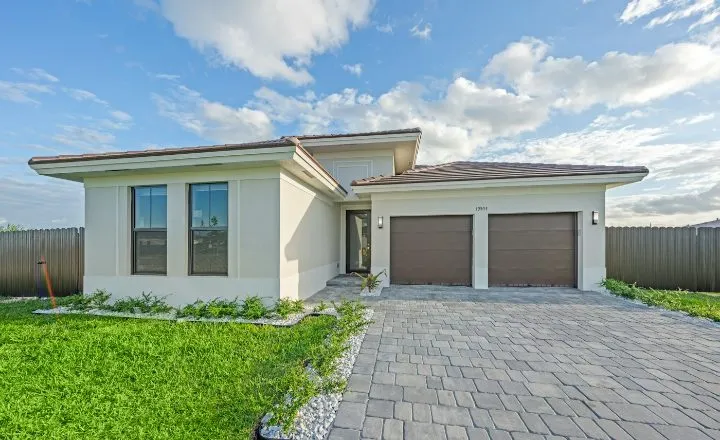 CYPRESSHOMES14 Juniper BendOak TerraceConroe, TX$587,400 Move In Ready4 bds · 3.5 ba · 2690 sqft
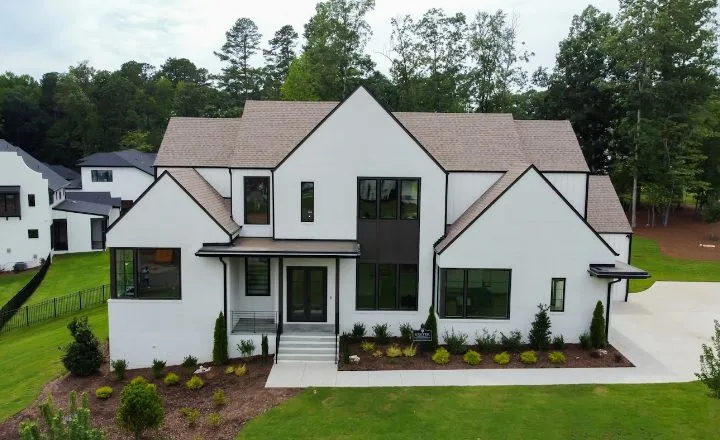 CYPRESSHOMES2207 Briar GlenPine HollowConroe, TX$412,500 Under Construction4 bds · 2.5 ba · 2215 sqftNatalie BrooksOctober 12, 2026 5:00 PMSENT 2 HOMES
Client is looking for a home under $2,900/month with a community pool, low HOA, near Conroe ISD. ...Read More
7Agent Portal
Review the replies
Replies show up under Buyer Requests, with unread badges. Open a request to read each builder’s note, then View homes to see what they sent.
Found the one? Let the builder know from the home card, then Close request so no new replies come in.
1 ReplyClient is looking for a home under $2,900/month with a community pool, low HOA, near Conroe ISD. Wants a corner lot5:00 PM
2 RepliesSingle story with a pool, Montgomery or Willis, up to $500KOct 4
1 ReplyFirst-time buyers, USDA eligible, low tax rate north of HoustonSep 28
No RepliesRelocating family, 5 beds, game room, ready in 60 daysSep 21
Client is looking for a home under $2,900/month with a community pool, low HOA, near Conroe ISD. Wants a corner lot and fenced… Read More
CLOSE REQUESTBUILDER RESPONSES
Harrison Voss from Cypress Landing Homes sent 2 homesOctober 12, 2026 5:00 PMHi Natalie! Check out these 2 homes. They just came on the market and I think they’re perfect for your client. Plus…Read MoreVIEW 2 HOMESHarrison Voss EmailCypress Landing Homes
2 HOMES
CYPRESSHOMESHARRISON14 Juniper BendOak TerraceConroe, TX$587,400 Move In Ready4 bds · 3.5 ba · 2690 sqftCYPRESSHOMESHARRISON2207 Briar GlenPine HollowConroe, TX$412,500 Under Construction4 bds · 2.5 ba · 2215 sqftTips for great replies
- Be specific
Price, beds and baths, areas, school district and must-haves. The more detail, the better the match.
- Include timing
Ready now, just starting, or needs to move by a certain date.
- Draw the area
A quick outline on the map shows reps where your buyer wants to be at a glance.
- Ask several builders
Even a “nothing today” reply often comes with upcoming homes and plans that aren’t on the MLS yet.
Prefer video?
Watch the full walkthrough.


